Back to work
Case Study · Automotive UX

Leia Gabriel

The world's smallest luxury electric car, built for big, congested cities. It threads through traffic, skips the parking hunt, and takes the headache out of rush hour.

The LUV parked between two city cars, front three-quarter view on a dark studio floor
01About LUV

Built small, beautiful, and luxurious.

Cities are getting more congested, and the race to solve urban mobility is on. Bikes, motorcycles, even helicopters dodge traffic, but each comes with its own compromises. The LUV takes a different route: the world's smallest luxury electric vehicle. At 86cm wide and 340cm long it slips into parking spots nothing else fits, while still carrying two people in real comfort.

Rear view of the LUV parked between two city cars in a dark studio
Same footprint story from the back. The LUV occupies a fraction of a normal car's width.
02Scope of work

The LUV was in its advanced prototype phase. The team needed to design the dashboard and control panels inside the car, and they were up against two hard limits: very little space, and a shortage of components small enough to run everything the car promised.

Scope of Work

  1. 01

    Information architecture for the main dashboard

    Structure every feature the car offered into something a driver could navigate without looking away from the road.

  2. 02

    Steering wheel as a navigation point

    Brainstorm, research, and test the wheel as a primary way to move through the interface.

  3. 03

    Door control panels as a navigation point

    Brainstorm and test the door panels as a second set of physical controls.

  4. 04

    UI design

    Translate the structure into the on-screen interface, matching the LUV brand.

  5. 05

    Handoff and documentation

    Detailed design handoff so the dev team could build it into a real car.

03Challenges

Make everything reachable. With no touchscreen.

The core challenge: make the interface intuitive and let people reach every feature easily, without a touchscreen. This isn't only about comfort. A driver fighting the software instead of watching the road is a safety problem. And it was a lot to organise, multiple complex features with nested menus, all through physical controls.

Information architecture map: every feature grouped into always-visible, car status, energy, navigation, music and radio, calls, leaning angle and settings, with their nested menus
04Main dashboard

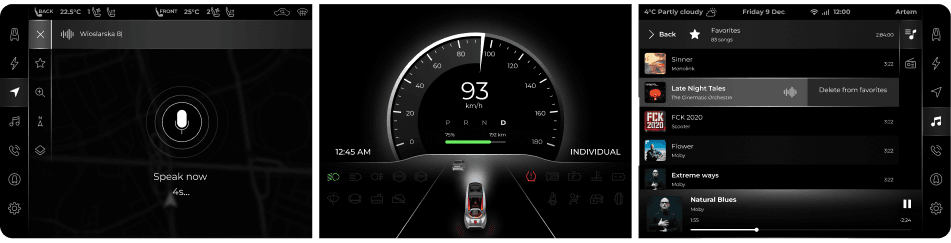
What you see here is a small slice of the hundreds of UI states we designed for the dashboard. The car was tiny, but the R&D team and investors didn't want to compromise on luxury, so the screen had to carry a full, premium feature set with nothing feeling stripped back.

The layout centered on a speed clock that always stayed in the middle, with two customizable screens, one on each side. Navigation, Music, Calls, Leaning Angle, Energy Consumption, and more all had to stay one glance away and instantly scannable, even on a display that small.

LUV dashboard interface screen
UI Design: Joanna Szymendera & Artem Tabachuk
05UX design

The engineers handed us a list of physical features. Our job was to design how the driver would control each one, with no room for extra buttons, switches, or a touchscreen. Every choice had to earn its place within very tight constraints.

So we built a working prototype that mimicked how the final dashboard would behave, then tested it with real users.

06Steering wheel

The dev team designed and 3D-printed a prototype wheel scaled to the car. We tested it, and it failed: too thick, uncomfortable to hold, and the controls were hard to reach. It restricted how the driver could move.

User testing the 3D-printed prototype steering wheel

Don't reinvent the wheel.

The lesson was clear: a custom wheel was fighting us for no real gain. So we didn't reinvent it. We took a proven steering wheel already on the market and added the few controls the LUV actually needed.

The production steering wheel with its added controls: touch bars, levers and paddle shifters, labelled a to c
  • a2× Touch bars
  • b2× Levers
  • c4× Paddle shifters

Wheel functions

Every control the driver needs is within a thumb or finger of the wheel, mapped so nothing competes with steering.

Annotated steering-wheel diagram mapping each touch bar, lever and paddle to its function

Dashboard functions

Annotated dashboard diagram: vehicle status, central speedometer and leaning-angle screens with their touchbar controls

Central screen with speedometer, important information, and notifications

07Controls overview

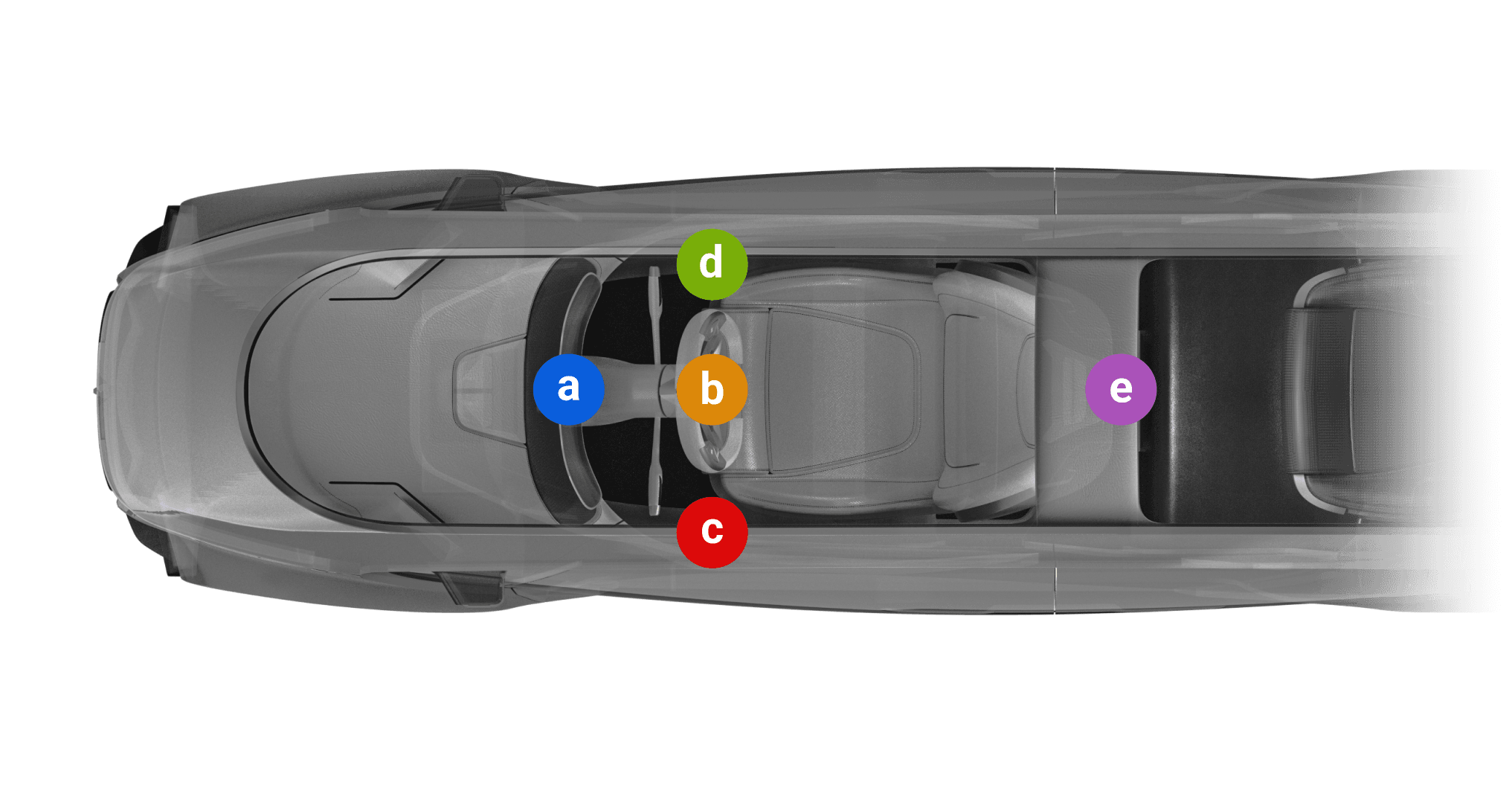
After weeks of workshops, meetings, and design sessions, we landed the final control layout, spread across the whole cabin so nothing needs a touchscreen.

Top-down view of the cabin with the five control zones called out: central panel, steering wheel, left and right door panels, and back seat tablet
  • aCentral panel
  • bSteering wheel
  • cLeft door panel
  • dRight door panel
  • eBack seat 10" tablet

Door panels

The doors carry the controls that didn't belong on the wheel or the central screen, split so the driver reaches comfort and the passenger reaches the lock.

Cross-section render of the right door panel and its controls
Right door
  • Lock door button
Cross-section render of the left door panel and its controls
Left door
  • Speed Limit & Cruise Control
  • Air Conditioning
  • Seat Configuration bar
08The result

The LUV reached showcar production. The steering wheel was manufactured and the UI was implemented in the physical car.

The car didn't enter mass production, but the design was fully built and running in the vehicle, along with the physical controls and steering wheel.

The finished LUV showcar, photographed on the street and in detail: exterior, cognac leather interior, landscape screen and production steering wheel

This project was built under real constraints: tiny space, missing parts, no touchscreen. It taught me and the team a lot about designing for focus and safety. Designing the user experience for a car leaves no room for error, since a wrong call can put a passenger's life at risk. And even though the process was detailed, it stayed fast and lean.